erlab.interactive.imagetool.manager
Manager for multiple ImageTool windows.

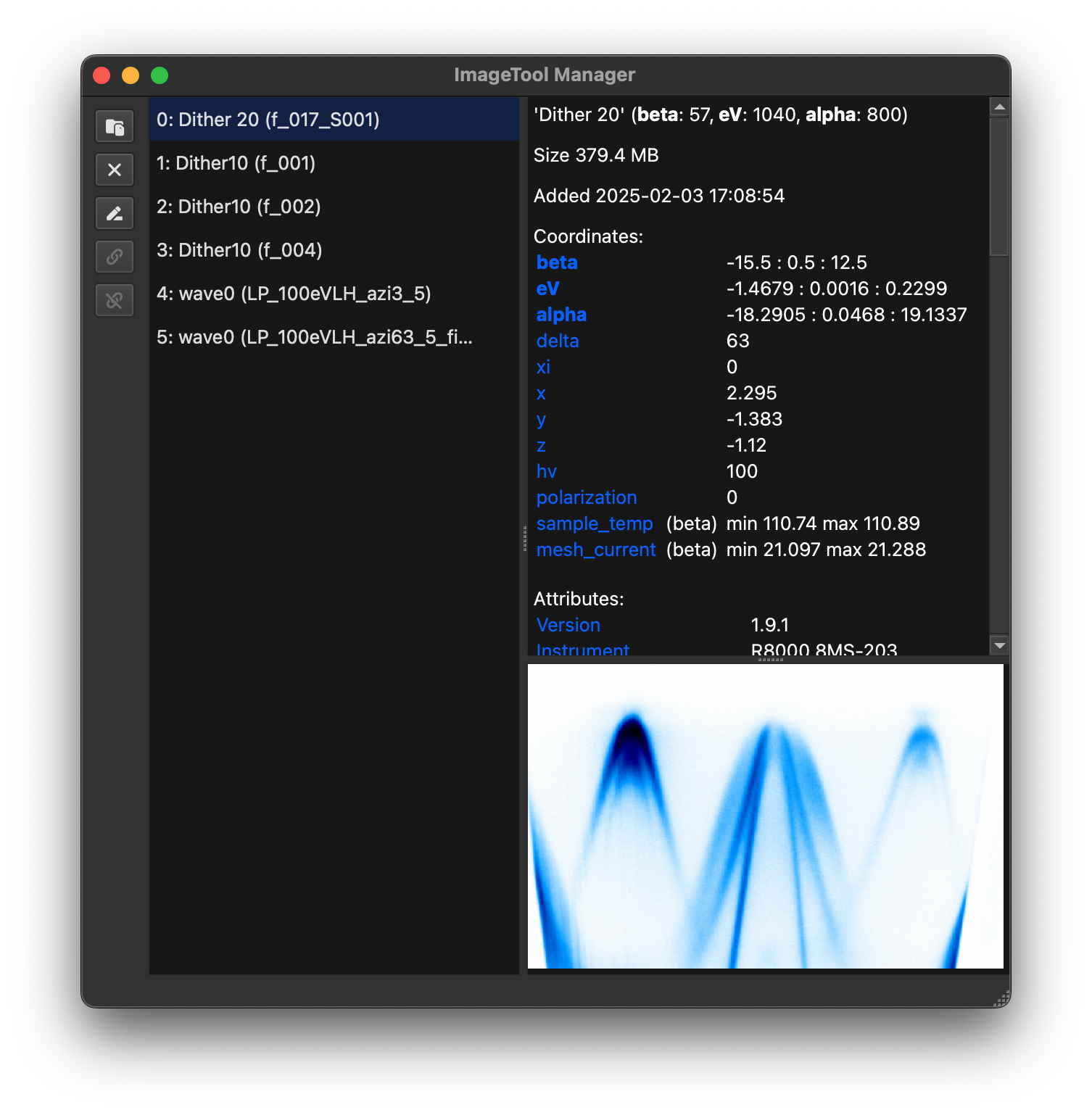
This module provides a GUI application for managing multiple ImageTool windows. The
application can be started by running the script itool-manager from the command line
in the environment where the package is installed.
Python scripts communicate with managers using ZeroMQ connections. The first manager uses the default request port 45555 and watch port 45556 when those ports are free; additional managers use dynamically assigned ports and can be selected by 0-based manager index.
Functions
Clear the default ImageTool manager for this Python process. |
|
|
Get data from the ImageTool window at the given index. |
|
Return the default ImageTool manager for this Python process. |
Return the path to the log file used by ImageTool Manager. |
|
|
Check whether an instance of ImageToolManager is active. |
|
Load and display data in the ImageToolManager. |
|
Start the ImageToolManager application. |
|
Return manager selection state for external clients. |
|
Push changed variables to manager for a given shell or namespace. |
|
Replace data in existing ImageTool windows. |
|
Set the default ImageTool manager for this Python process. |
|
Create and display ImageTool windows in the ImageToolManager. |
|
Shutdown watcher for a namespace and unregister associated hooks. |
|
Temporarily set the default ImageTool manager. |
|
Watch namespace variables and synchronize them with ImageTool manager. |
|
Return watched-variable metadata for the target manager. |
|
Return currently watched variable names for the selected namespace. |
Classes
The ImageToolManager window. |
|
|
Handle for a live ImageTool manager. |
Live ImageTool manager registry. |
Exceptions
Raised when a client operation needs an explicit manager target. |
|
Raised when a requested manager target is not available. |
- class erlab.interactive.imagetool.manager.ImageToolManager[source]
Bases:
_ImageToolManagerBaseThe ImageToolManager window.
This class implements a GUI application for managing multiple ImageTool windows.
Users do not need to create an instance of this class directly. Instead, use the command line script
itool-manageror the functionmainto start the application.- Signals:
sigLinkersChanged() – Signal emitted when the linker state is changed.
- add_childtool(tool, *, script_inputs, parent=None, show=True, uid=None, snapshot_token=None, source_snapshot_token=None, created_time=None, note=None)[source]
- add_figuretool(tool, *, show=True, uid=None, snapshot_token=None, source_snapshot_token=None, created_time=None, note=None)[source]
- add_imagetool(tool, *, show=True, activate=False, watched_var=None, watched_workspace_link_id=None, watched_source_label=None, watched_source_uid=None, watched_connected=True, source_input_ndim=None, source_input_dtype=None, uid=None, provenance_spec=None, source_spec=None, source_binding=None, source_auto_update=False, source_state='fresh', replay_source_data=None, replay_source_pending=False, index=None, snapshot_token=None, source_snapshot_token=None, created_time=None, note=None)[source]
Add a new ImageTool window to the manager and show it.
- Parameters:
tool (
ImageTool) – ImageTool object to be added.show (
bool, default:True) – Whether to show the window after adding, by defaultTrue.activate (
bool, default:False) – Whether to focus on the window after adding, by defaultFalse.watched_var (
tuple[str,str] |None, default:None) – If the tool is created from a watched variable, this should be a tuple of the variable name and its unique ID.source_input_ndim (
int|None, default:None) – Original dimensionality of the bound source before ImageTool-specific promotion (for example, promoted 1D inputs).
- Returns:
int– Index of the added ImageTool window.- Return type:
- add_imagetool_child(tool, parent, *, show=True, activate=False, uid=None, provenance_spec=None, source_spec=None, source_binding=None, source_auto_update=False, source_state='fresh', output_id=None, replay_source_data=None, replay_source_pending=False, snapshot_token=None, source_snapshot_token=None, created_time=None, note=None)[source]
- append_figure_from_targets(targets, *, figure_uid=None, axes_selection=None, operation=None, show=True)[source]
- color_for_workspace_link_key(link_key)[source]
Get the color that should represent a managed link group.
- create_figure_from_slicer_area(slicer_area, *, operation=None, custom_code=None, title=None, show=True)[source]
- create_figure_from_targets(targets, *, operation=None, custom_code=None, title=None, show=True)[source]
- exception erlab.interactive.imagetool.manager.ImageToolManagerAmbiguousError[source]
Bases:
RuntimeErrorRaised when a client operation needs an explicit manager target.
- class erlab.interactive.imagetool.manager.ImageToolManagerHandle(*, index, pid, host, port, watch_port, started, version, workspace_path=None, is_default=False)[source]
Bases:
objectHandle for a live ImageTool manager.
- exception erlab.interactive.imagetool.manager.ImageToolManagerNotFoundError[source]
Bases:
RuntimeErrorRaised when a requested manager target is not available.
- class erlab.interactive.imagetool.manager.ImageToolManagerRegistry[source]
Bases:
objectLive ImageTool manager registry.
The registry is a lightweight view over the live manager registry. It refreshes whenever it is displayed, iterated, or indexed.
Added in version 3.22.0.
- erlab.interactive.imagetool.manager.clear_default_manager()[source]
Clear the default ImageTool manager for this Python process.
- erlab.interactive.imagetool.manager.fetch(index, *, target=None)[source]
Get data from the ImageTool window at the given index.
- Parameters:
index (
int|str) – Index of the ImageTool window to get data from, or the unique identifier (UID) of a watched variable (used internally).target (
int|None, default:None) – Optional 0-based manager index. If omitted, the current process default is used. If no default is set, the only live manager is used. If multiple managers are live, an ambiguity error is raised.
- Returns:
xr.DataArrayorNone– The data in the ImageTool window at the given index, orNoneif the index is invalid or the data cannot be retrieved.- Return type:
DataArray | None
- erlab.interactive.imagetool.manager.get_default_manager(*, validate=True)[source]
Return the default ImageTool manager for this Python process.
- erlab.interactive.imagetool.manager.get_log_file_path()[source]
Return the path to the log file used by ImageTool Manager.
- erlab.interactive.imagetool.manager.is_running(target=None)[source]
Check whether an instance of ImageToolManager is active.
- erlab.interactive.imagetool.manager.load_in_manager(paths, loader_name=None, *, target=None, **load_kwargs)[source]
Load and display data in the ImageToolManager.
- Parameters:
paths (
Iterable[str|PathLike]) – List of paths containing the data to be displayed in the ImageTool window.loader_name (
str|None, default:None) – Name of a registered loader or an enabled manager extension loader.target (
int|None, default:None) – Optional 0-based manager index. If omitted, the current process default is used. If no default is set, the only live manager is used. If multiple managers are live, an ambiguity error is raised.**load_kwargs – Additional keyword arguments passed onto the load method of the loader.
- Returns:
ResponseorNone– Manager response for socket calls. ReturnsNonewhen the manager is in the same Python process and the data is passed directly.- Return type:
Response | None
- erlab.interactive.imagetool.manager.main(execute=True)[source]
Start the ImageToolManager application.
Running
itool-managerfrom a shell will invoke this function.
- erlab.interactive.imagetool.manager.manager_selection_info(*, lock_timeout_ms=10000)[source]
Return manager selection state for external clients.
- Returns:
dict– JSON-serializable dictionary with live manager records, the current default index, the resolved index when one can be selected without prompting, aneeds_selectionflag, and a reason string. The reason is one of"none","single","default", or"multiple".- Return type:
- erlab.interactive.imagetool.manager.maybe_push(*, shell=None, namespace=None)[source]
Push changed variables to manager for a given shell or namespace.
In IPython kernels with
post_run_cellsupport, this is usually not required because pushes are triggered automatically after each cell. In environments that rely on polling (for example, marimo), this can be used to force an immediate check outside the polling cadence.- Parameters:
shell (
_ShellProtocol|None, default:None) – Shell-like object exposinguser_ns. This takes precedence overnamespacewhen both are given.namespace (
MutableMapping[str,Any] |None, default:None) – Namespace mapping used only whenshellis not provided. By default, marimo kernel globals are used when running in marimo; otherwise the caller module globals are used if no IPython shell is detected.
- erlab.interactive.imagetool.manager.replace_data(index, data, *, target=None)[source]
Replace data in existing ImageTool windows.
- Parameters:
index (
int|str|Collection[int|str]) – Index or indices of the ImageTool windows to replace data in. Ifdatacorresponds to a single ImageTool window, for instance a single DataArray,indexis allowed to be a single integer. Ifdatacorresponds to multiple ImageTool windows, for instance a list of DataArrays,indexmust be a list of integers with the same length asdata. All indices must be valid indices of existing ImageTool windows.data (
Sequence[DataArray|ndarray[tuple[Any,...],dtype[TypeVar(_ScalarT, bound=generic)]]] |DataArray|ndarray[tuple[Any,...],dtype[TypeVar(_ScalarT, bound=generic)]] |Dataset|DataTree) – Data to replace the existing data in the ImageTool windows. Seeitoolfor more information.target (
int|None, default:None) – Optional 0-based manager index. If omitted, the current process default is used. If no default is set, the only live manager is used. If multiple managers are live, an ambiguity error is raised.
- Returns:
Response– Manager response.- Return type:
Response
- erlab.interactive.imagetool.manager.set_default_manager(index)[source]
Set the default ImageTool manager for this Python process.
- Parameters:
index (
int) – 0-based manager index fromerlab.interactive.imagetool.manager.managers.- Returns:
int– The selected manager index.- Raises:
ValueError – If
indexis negative or no live manager has that index.- Return type:
- erlab.interactive.imagetool.manager.show_in_manager(data, target=None, **kwargs)[source]
Create and display ImageTool windows in the ImageToolManager.
- Parameters:
data (
Sequence[DataArray|ndarray[tuple[Any,...],dtype[TypeVar(_ScalarT, bound=generic)]]] |DataArray|ndarray[tuple[Any,...],dtype[TypeVar(_ScalarT, bound=generic)]] |Dataset|DataTree|None) – The data to be displayed in the ImageTool window. Seeitoolfor more information.target (
int|None, default:None) – Optional 0-based manager index. If omitted, the current process default is used. If no default is set, the only live manager is used. If multiple managers are live, an ambiguity error is raised.link – Whether to enable linking between multiple ImageTool windows, by default
False.link_colors – Whether to link the color maps between multiple linked ImageTool windows, by default
True.**kwargs – Keyword arguments passed onto
ImageTool.
- Returns:
ResponseorNone– Manager response for socket calls. ReturnsNonewhen the manager is in the same Python process and the data is passed directly.- Return type:
Response | None
- erlab.interactive.imagetool.manager.shutdown(*, shell=None, namespace=None, remove=False)[source]
Shutdown watcher for a namespace and unregister associated hooks.
This removes IPython
post_run_cellcallbacks when present and stops fallback polling threads used in non-IPython environments.- Parameters:
shell (
_ShellProtocol|None, default:None) – Shell-like object exposinguser_ns. This takes precedence overnamespacewhen both are given.namespace (
MutableMapping[str,Any] |None, default:None) – Namespace mapping used only whenshellis not provided. By default, marimo kernel globals are used when running in marimo; otherwise the caller module globals are used if no IPython shell is detected.remove (
bool, default:False) – IfTrue, remove watched variables from manager while shutting down.
- erlab.interactive.imagetool.manager.use_manager(index)[source]
Temporarily set the default ImageTool manager.
- Parameters:
index (
int) – 0-based manager index to use inside the context.
- erlab.interactive.imagetool.manager.watch(*varnames, shell=None, namespace=None, stop=False, remove=False, stop_all=False, restore=False, target=None, source_label=None, poll_interval_s=0.25)[source]
Watch namespace variables and synchronize them with ImageTool manager.
Target resolution follows a shell-first policy:
If
shellis provided,shell.user_nsis always used.Else if
namespaceis provided, that mapping is used.Else, try the active IPython shell.
If no IPython shell is available, use marimo kernel globals when running in marimo; otherwise fall back to the caller module globals.
In most cases, simply using
watch("varname")without specifyingshellornamespaceshould work as expected in both IPython and regular Python scripts.Synchronization behavior differs by environment:
IPython kernels that expose a
post_run_cellevent use that event hook to detect outbound variable changes, so synchronization is done immediately after each cell execution.Other environments (for example, marimo or plain Python namespaces) use a background polling thread to detect outbound changes. The polling interval can be configured with
poll_interval_s. When using polling, changes are pushed to the manager at most once perpoll_interval_sseconds.
For inbound updates from the ImageTool manager, shells that expose
kernel.io_loop(typical IPython kernels) schedule namespace mutation on the kernel event loop. Other shells apply updates directly on the watcher thread.- Parameters:
*varnames (
str) – Variable names to watch or stop watching.shell (
_ShellProtocol|None, default:None) – Shell-like object exposinguser_ns. This takes precedence overnamespacewhen both are given.namespace (
MutableMapping[str,Any] |None, default:None) – Namespace mapping used only whenshellis not provided. By default, marimo kernel globals are used when running in marimo; otherwise the caller module globals are used if no IPython shell is detected.stop (
bool, default:False) – IfTrue, stop watching specified variables.remove (
bool, default:False) – IfTrue, stop watching the specified variables and also remove their rows from ImageTool Manager.stop_all (
bool, default:False) – IfTrue, stop watching all variables in the namespace.restore (
bool, default:False) – IfTrue, reconnect watched variables stored in the selected ImageTool manager workspace when variables with matching names exist in the namespace.target (
int|None, default:None) – Optional 0-based ImageTool manager index to watch into. If omitted, the current process default is used. If no default is set, the only live manager is used. If multiple managers are live, an ambiguity error is raised.source_label (
str|None, default:None) – Optional integration-supplied notebook/source label used to disambiguate saved watched rows. Regular notebook users do not need to set this.poll_interval_s (
float, default:0.25) – Polling interval in seconds for fallback polling when post-run hooks are unavailable (for example, non-IPython environments). Must be greater than 0. This value is ignored when a post-run callback is successfully registered.
- Returns:
tupleofstr– Currently watched variable names after applying the operation.- Return type:
- erlab.interactive.imagetool.manager.watch_info(*, target=None)[source]
Return watched-variable metadata for the target manager.
This is primarily intended for editor integrations and the watcher restore workflow.
Added in version 3.22.0.
- erlab.interactive.imagetool.manager.watched_variables(*, shell=None, namespace=None)[source]
Return currently watched variable names for the selected namespace.
Target resolution uses the same shell-first policy as
watch(): useshell.user_nswhenshellis provided, otherwise usenamespace. When neither is provided, the active IPython shell is used if available; otherwise caller globals are used.- Parameters:
shell (
_ShellProtocol|None, default:None) – Shell-like object exposinguser_ns. This takes precedence overnamespacewhen both are given.namespace (
MutableMapping[str,Any] |None, default:None) – Namespace mapping used only whenshellis not provided. By default, marimo kernel globals are used when running in marimo; otherwise the caller module globals are used if no IPython shell is detected.
- Returns:
- Return type: