Transformations
The erlab.analysis.transform module provides transformations for xarray.DataArray objects. Typical use cases include rotating 2D maps, compensating for shifts, and symmetrizing spectra.
import matplotlib.pyplot as plt

import erlab.analysis as era
import erlab.plotting as eplt
from erlab.io.exampledata import generate_data, generate_hvdep_cuts
Rotate maps and volumes
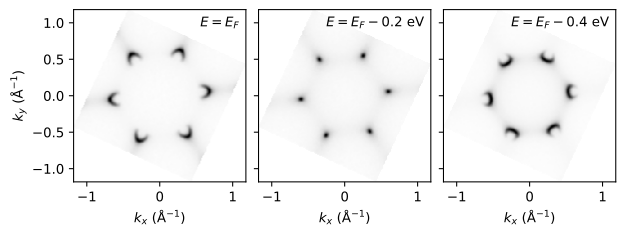
The erlab.analysis.transform.rotate() function rotates data in the plane defined by two dimensions. Any remaining dimensions are preserved, so a 3D volume is rotated slice-by-slice (for example, rotating the \(k_x\)-\(k_y\) plane for every energy). Coordinates along the rotated axes must be evenly spaced.
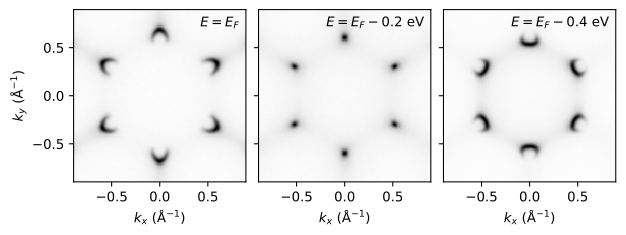
Below we create a synthetic \(k_x\)-\(k_y\)-\(E\) volume and rotate it.
# Simulated kx-ky-eV volume (graphene-like tight-binding model).
volume = generate_data(
    shape=(160, 160, 180),
    bandshift=-0.2,
    seed=1,
).transpose("ky", "kx", "eV")


fig, axs = eplt.plot_slices(
    [volume],
    eV=[0.0, -0.2, -0.4],
    axis="image",
    figsize=(6.4, 3.0),
    cmap="Greys",
    gamma=0.5,
)
rotated = era.transform.rotate(
    volume,
    angle=25.0,
    axes=("ky", "kx"),
    center={"ky": 0.0, "kx": 0.0},
    reshape=True,
)

fig, axs = eplt.plot_slices(
    [rotated],
    eV=[0.0, -0.2, -0.4],
    axis="image",
    figsize=(6.4, 2.5),
    cmap="Greys",
    gamma=0.5,
)
GUI equivalent
Rotation can also be performed in ImageTool, which also provides guidelines for tuning the center and angle of the rotation interactively.
Shift spectra to correct drift
The erlab.analysis.transform.shift() function shifts data along a single dimension. If you supply a DataArray for the shift values, the shift can vary across any other dimensions, and it will broadcast across the remaining ones.
Here we generate a synthetic \(h\nu\)-dependent stack with an energy drift across hν:
# Photon-energy dependent cuts: alpha x eV x hv.
spectra = generate_hvdep_cuts(
    shape=(9, 250, 300),
    Erange=(-0.25, 0.08),
    hvrange=(60.0, 100.0),
    bandshift=-0.2,
    hv_shift=(-0.012, 0.008),
    noise=False,
)

alpha = spectra["alpha"].values
hv = spectra["hv"].values

fig, axs = plt.subplots(1, 3, figsize=(9.6, 3.0))
spectra.isel(hv=0).T.qplot(ax=axs[0], cmap="Greys", gamma=0.5)
spectra.isel(hv=-1).T.qplot(ax=axs[1], cmap="Greys", gamma=0.5)
spectra.qsel(alpha=0.0).qplot(ax=axs[2], cmap="Greys", gamma=0.5)
eplt.set_titles(
    axs,
    [
        rf"$hν = {hv[0]:.1f}$ eV",
        rf"$hν = {hv[-1]:.1f}$ eV",
        "constant angle ($α = 0.0°$)",
    ],
)
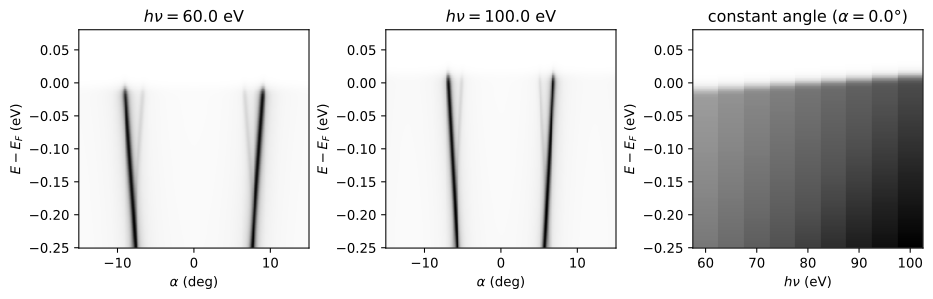
You can see that the Fermi level shifts as a function of photon energy.
First, we extract the shift values using a fit to a broadened step function:
fit_result = spectra.qsel(alpha=0.0).xlm.modelfit(
    "eV",
    model=era.fit.models.StepEdgeModel(),
    guess=True,
)

shift = fit_result.modelfit_coefficients.sel(param="center")

fig, ax = plt.subplots()
spectra.qsel(alpha=0.0).qplot(ax=ax, cmap="Greys", gamma=0.5)
ax.plot(fit_result.hv, shift, "ro-")
ax.set_xlabel("$hν$ (eV)")
ax.set_ylabel("Extracted $E_F$ (eV)")
Text(0, 0.5, 'Extracted $E_F$ (eV)')
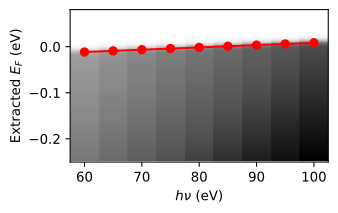
By supplying the shift values to erlab.analysis.transform.shift(), we can correct for this drift and align the spectra.
aligned = era.transform.shift(spectra, shift=-shift, along="eV")

fig, axs = plt.subplots(1, 3, figsize=(9.6, 3.0))
aligned.isel(hv=0).T.qplot(ax=axs[0], cmap="Greys", gamma=0.5)
aligned.isel(hv=-1).T.qplot(ax=axs[1], cmap="Greys", gamma=0.5)
aligned.qsel(alpha=0.0).qplot(ax=axs[2], cmap="Greys", gamma=0.5)
eplt.set_titles(
    axs,
    [
        rf"$hν = {hv[0]:.1f}$ eV",
        rf"$hν = {hv[-1]:.1f}$ eV",
        "constant angle ($α = 0.0°$)",
    ],
)
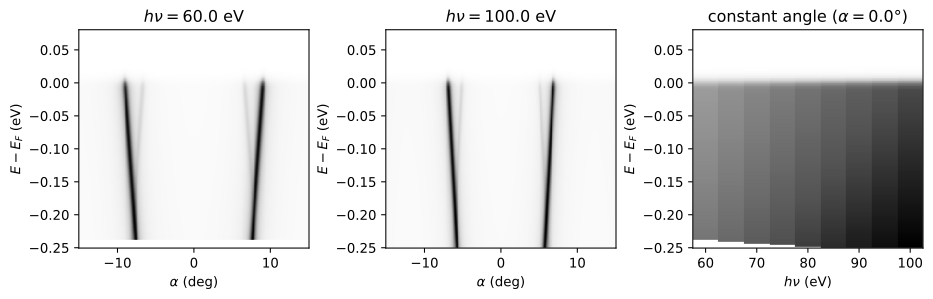
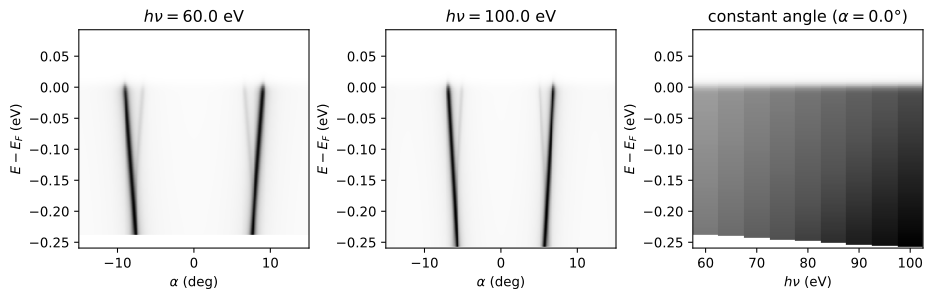
Now, the Fermi levels are aligned across all photon energies. The energy coordinates remain unchanged; only the data values have been shifted.
If the shift values are very large, the resulting spectra may contain large regions of NaNs where no data is available after the shift. In such cases, using shift_coords=True will also shift the coordinate values to include all data points after the shift. An example of this is shown below:
# Expand coordinates to retain the full shifted range.
aligned_full = era.transform.shift(
    spectra,
    shift=-shift,
    along="eV",
    shift_coords=True,
)

fig, axs = plt.subplots(1, 3, figsize=(9.6, 3.0))
aligned_full.isel(hv=0).T.qplot(ax=axs[0], cmap="Greys", gamma=0.5)
aligned_full.isel(hv=-1).T.qplot(ax=axs[1], cmap="Greys", gamma=0.5)
aligned_full.qsel(alpha=0.0).qplot(ax=axs[2], cmap="Greys", gamma=0.5)
eplt.set_titles(
    axs,
    [
        rf"$hν = {hv[0]:.1f}$ eV",
        rf"$hν = {hv[-1]:.1f}$ eV",
        "constant angle ($α = 0.0°$)",
    ],
)
Symmetrization
Symmetrize about a center
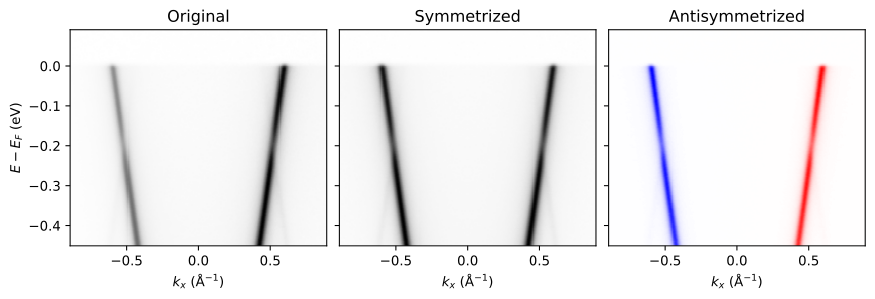
The erlab.analysis.transform.symmetrize() function reflects data about a center and adds (or subtracts) it to produce symmetrized or antisymmetrized outputs. Symmetrization is applied along a single dimension while all other dimensions are preserved.
We start from a \(k_x\)-\(E\) cut. To mimic matrix-element asymmetry, we apply a gentle \(k_x\)-dependent weighting before symmetrizing about \(k_x = 0\).
Symmetrization also broadcasts over any remaining dimensions, so you can apply it to higher-dimensional data without manually looping over slices.
cut = generate_data(seed=3, bandshift=-0.2).qsel(ky=0.3).T

# Apply a weak kx-dependent weight to emulate matrix-element effects.
kx_weight = 0.1 + (cut.kx - cut.kx.min()) / (cut.kx.max() - cut.kx.min())
cut = cut * kx_weight

sym = era.transform.symmetrize(cut, dim="kx", center=0.0)
antisym = era.transform.symmetrize(cut, dim="kx", center=0.0, subtract=True)

fig, axs = eplt.plot_slices(
    [cut, sym, antisym],
    order="F",
    figsize=(9, 3),
    cmap=["Greys", "Greys", "bwr"],
    gamma=0.5,
    norm=[None, None, eplt.CenteredInversePowerNorm(1.0)],
)
eplt.set_titles(axs, ["Original", "Symmetrized", "Antisymmetrized"])
For additional options (such as returning only half of the symmetrized data), see
the API reference at erlab.analysis.transform.
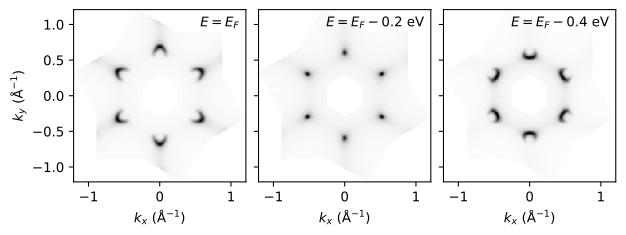
Rotational n-fold symmetrization
Use erlab.analysis.transform.symmetrize_nfold() when a map should be averaged
over repeated in-plane rotations. For example, a 4-fold symmetrization of a \(k_x\)-\(k_y\) map would average over the original map and maps rotated by 90°, 180°, and 270°.
Let’s try it out with a \(k_x\)-\(k_y\)-\(E\) volume, sliced in momentum to include only a single K pocket.
volume_partial = volume.where((volume.kx < -0.25) * (volume.ky < 0.15), drop=True)

fig, axs = eplt.plot_slices(
    [volume_partial],
    eV=[0.0, -0.2, -0.4],
    axis="image",
    figsize=(6.4, 3.0),
    cmap="Greys",
    gamma=0.5,
)
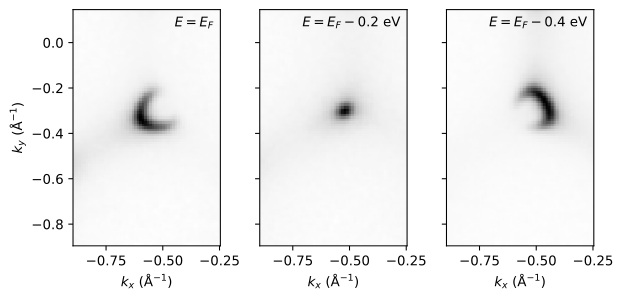
We can symmetrize the pocket with respect to 6-fold rotations about the Brillouin zone center.
The reshape=True option ensures that the output coordinates are reshaped to include the full symmetrized region.
volume_partial_sym = era.transform.symmetrize_nfold(
    volume_partial, 6, axes=("kx", "ky"), center={"kx": 0.0, "ky": 0.0}, reshape=True
)

fig, axs = eplt.plot_slices(
    [volume_partial_sym],
    eV=[0.0, -0.2, -0.4],
    axis="image",
    figsize=(6.4, 3.0),
    cmap="Greys",
    gamma=0.5,
)
GUI equivalent
Symmetrization can also be performed in ImageTool.