Reading & writing data
In ERLabPy, data are represented as xarray.DataArray, xarray.Dataset, and xarray.DataTree objects.
xarray.DataArrayobjects are similar to waves in Igor Pro, but are much more flexible. As opposed to the maximum of 4 dimensions in Igor,xarray.DataArraycan have as many dimensions as you want (up to 64). Another advantage is that the coordinates of the dimensions do not have to be evenly spaced. In fact, they are not limited to numbers but can be any type of data, such as date and time representations.xarray.Datasetis a collection ofxarray.DataArrayobjects. It is used to store multiple data arrays that are related to each other, such as a set of measurements.xarray.DataTreeis a hierarchical data structure that can store multiplexarray.Datasetobjects, just like an Igor experiment file with multiple waves within nested folders.
See Data Structures in the xarray documentation for a general introduction to xarray data structures.
This guide will introduce you to reading and writing data from and to various file formats, and how to implement a custom plugin for an experimental setup.
Note
If you are not familiar with xarray, it is recommended to read the xarray tutorial and the xarray user guide first.
Skip to the corresponding section for guides on loading ARPES data.
Reading data with xarray
xarray provides basic support for reading and writing NetCDF and HDF5 files into xarray objects. See the xarray documentation on I/O operations for more information.
Here, we will focus on working with data exported from Igor Pro and other commonly used file formats.
From Igor Pro
Installing ERLabPy automatically registers a backend for xarray that allows reading .pxt, .pxp, and .ibw files, and .itx files containing a single wave. This means that you can load these files directly into xarray using xarray.open_dataset() or xarray.open_dataarray() as if they were NetCDF files.
In most cases, xarray will automatically detect the file format. For example, to load an .ibw file into a xarray.DataArray, use the following code:
import xarray as xr

data = xr.open_dataarray("path/to/wave.ibw")
Loading an experiment file to a xarray.DataTree is also possible:
data = xr.open_datatree("path/to/experiment.pxp")
Along with the Igor Pro file formats, the backend also supports loading HDF5 files exported from Igor Pro. For such files, the engine must be specified explicitly with engine="erlab-igor".
Warning
Loading waves from complex .pxp files may fail or produce unexpected results. It is recommended to export the waves to a .ibw file to load them in ERLabPy. If you encounter any problems, please let us know by opening an issue.
From arbitrary formats
There are many Python libraries that can read and write data in various formats. Here, some common file formats and how to read them are listed:
Spreadsheet data can be read using
pandas.read_csv()andpandas.read_excel().The resulting DataFrame can be converted to an xarray object using
pandas.DataFrame.to_xarray()orxarray.Dataset.from_dataframe().When reading HDF5 files with arbitrary groups and metadata, you must first explore the group structure using h5netcdf. More conveniently, you can use
xarray.open_groups()to inspect the group structure.FITS files can be read with astropy. A useful function that utilizes astropy to read FITS files into xarray is provided in
erlab.io.fitsutils.For working with NeXus files, see
erlab.io.nexusutils.
Writing xarray objects to a file
Since the state and variables of a Python interpreter are not saved, it is important to save your data in a format that can be easily read and written.
While it is possible to save and load entire Python interpreter sessions using pickle or the more versatile dill, it is out of the scope of this guide. Instead, we recommend saving your data in a format that is easy to read, write, and share, such as HDF5 or NetCDF. This can be done easily using methods provided by xarray, like xarray.DataArray.to_netcdf(). For detailed information, see the xarray documentation on I/O operations.
To Igor Pro
ERLabPy provides erlab.io.igor.save_wave() to save simple xarray.DataArray objects to Igor Pro binary files (.ibw). The DataArray can have up to 4 dimensions, and the coordinates of the dimensions must be uniformly spaced. Also, any non-dimensional coordinates will not be saved.
import erlab

erlab.io.igor.save_wave(data, "path/to/wave.ibw")
ARPES data
ARPES data from synchrotron endstations and laboratory setups worldwide are saved in diverse formats. ERLabPy’s data loading framework strives to offer a unified interface for loading ARPES data from various sources.
To ensure seamless integration with common analysis procedures like momentum conversion and Fermi edge fitting, the data loaded into xarray objects must adhere to specific conventions.
Conventions
Note
These conventions are not strictly enforced, but adhering to them will simplify the use of the provided analysis tools.
Generally, any type of xarray object will be compatible with analysis routines that aren’t specific to ARPES, such as plotting, masking, transformations, curve fitting, interpolation, and so on.
These are some rules that loaded ARPES data must follow to ensure compatibility with analysis procedures such as momentum conversion and fermi edge fitting:
Information about the experimental geometry is stored in the
'configuration'attribute as an integer from 1 to 4. See Nomenclature andAxesConfigurationfor more information.Angles are stored in coordinates that are named according to the conventions in Nomenclature.
The energy (binding or kinetic) is stored in a coordinate named
'eV'. The sign of binding energies should be negative for occupied states.The photon energy must be stored in a coordinate named
'hv'.The sample temperature, if available, is stored in an attribute or coordinate named
'sample_temp'.The work function of the system, if available, is stored in an attribute named
'sample_workfunction'.The angular resolution of the experiment, if available, is stored in an attribute named
'angle_resolution'. This is only used to estimate momentum grid sizes when converting to momentum space.During momentum conversion, an all-positive
'eV'coordinate is automatically interpreted as kinetic energy and converted to binding energy using'hv'and'sample_workfunction'. Otherwise (i.e., if the'eV'coordinate contains negative values), it is assumed to already be in binding energy.
In addition, the following units are used:
Quantity |
Unit |
|---|---|
Energy |
eV |
Angle |
deg |
Temperature |
K |
Loading
ERLabPy’s data loading framework consists of various plugins, or loaders, each
designed to load data from a different beamline or laboratory. Each loader is a class
instance that has a load method which takes a file path or sequence number and returns
data.
Let’s see the list of available loaders:
import erlab

erlab.io.loaders
| Name | Description | Loader class |
|---|---|---|
| da30 | Scienta Omicron DA30 with SES | erlab.io.plugins.da30.DA30Loader |
| erpes | KAIST home lab setup | erlab.io.plugins.erpes.ERPESLoader |
| esm | NSLS-II Beamline ID21 ESM | erlab.io.plugins.esm.ESMLoader |
| hers | ALS Beamline 10.0.1 HERS | erlab.io.plugins.hers.HERSLoader |
| i05 | Diamond Beamline I05 | erlab.io.plugins.i05.I05Loader |
| kriss | KRISS ARPES-MBE | erlab.io.plugins.kriss.KRISSLoader |
| lorea | ALBA Beamline 20 LOREA | erlab.io.plugins.lorea.LOREALoader |
| maestro | ALS Beamline 7.0.2.1 MAESTRO | erlab.io.plugins.maestro.MAESTROMicroLoader |
| mbs | MB Scientific .txt and .krx files | erlab.io.plugins.mbs.MBSLoader |
| merlin | ALS Beamline 4.0.3 MERLIN | erlab.io.plugins.merlin.MERLINLoader |
| pal4a1 | PAL Beamline 4A1 | erlab.io.plugins.pal4a1.PAL4A1Loader |
| snu1 | System 1 at Seoul National University | erlab.io.plugins.snu1.System1Loader |
| ssrl52 | SSRL Beamline 5-2 | erlab.io.plugins.ssrl52.SSRL52Loader |
| Current loader | Not set |
|---|---|
| Current data directory | Not set |
You can access each loader using its name as an attribute or an item. For example, to access the loader for the ALS beamline 4.0.3 (MERLIN), you can use any of the following methods:
erlab.io.loaders["merlin"]
erlab.io.loaders.merlin
<erlab.io.plugins.merlin.MERLINLoader at 0x7954acf59550>
Data loading is done by calling the load method of the loader. It requires an identifier parameter, which can be a path to a file or a sequence number. It also accepts a data_dir parameter, which specifies the directory where the data is stored.
If
identifieris a sequence number,data_dirmust be provided.If
identifieris a string anddata_diris provided, the path is constructed by joiningdata_dirandidentifier.If
identifieris a string anddata_diris not provided,identifiershould be a valid path to a file.
Suppose we have data from the ALS beamline 4.0.3 stored as /path/to/data/f_001.pxt, /path/to/data/f_002.pxt, etc. To load f_001.pxt, all three of the following are valid:
loader = erlab.io.loaders["merlin"]

loader.load("/path/to/data/f_001.pxt")
loader.load("f_001.pxt", data_dir="/path/to/data")
loader.load(1, data_dir="/path/to/data")
Setting the default loader and data directory
In practice, a loader and a single directory will be used repeatedly in a session to load different data from the same experiment.
Instead of explicitly specifying the loader and directory each time, a default loader and data directory can be set with erlab.io.set_loader() and erlab.io.set_data_dir(). All subsequent calls to the shortcut function erlab.io.load() will use the specified loader and data directory.
erlab.io.set_loader("merlin")
erlab.io.set_data_dir("/path/to/data")
data_1 = erlab.io.load(1)
data_2 = erlab.io.load(2)
The loader and data directory can also be controlled with a context manager:
with erlab.io.loader_context("merlin", data_dir="/path/to/data"):
    data_1 = erlab.io.load(1)
Note
Loader names are case-sensitive, so make sure to use the correct case when specifying the loader name.
Temporary loader extensions
Loader plugins use attributes such as name_map, coordinate_attrs, and additional_coords to standardize data after reading a file. You can temporarily extend those settings without editing the plugin class with erlab.io.extend_loader().
This is useful when a value stored as file metadata should become part of the loaded
data model. For example, if a scan is stored across multiple files and each file records
scan_number as an attribute, adding it to coordinate_attrs promotes that attribute
to a coordinate. The coordinate is then propagated when the files are combined instead
of being left as per-file metadata that may be dropped or conflict during concatenation.
The context manager erlab.io.extend_loader() applies temporary changes for all
loads executed inside the with block:
with erlab.io.extend_loader(coordinate_attrs=("scan_number",)):
    data = erlab.io.load(1)
For a single load, prefer the keyword-argument form:
data = erlab.io.load(
    1,
    loader_extensions={"coordinate_attrs": ("scan_number",)},
)
loader_extensions is also accepted by a specific loader instance:
loader = erlab.io.loaders["merlin"]
data = loader.load(
    1,
    data_dir="/path/to/data",
    loader_extensions={"additional_coords": {"scan": 1}},
)
Data across multiple files
For setups like the ALS beamline 4.0.3, some scans are stored over multiple files like
f_003_S001.pxt, f_003_S002.pxt, and so on. In this case, the loader will
automatically concatenate all files in the same scan. For example, all of the
following will return the same concatenated data:
erlab.io.load(3)
erlab.io.load("f_003_S001.pxt")
erlab.io.load("f_003_S002.pxt")
If you want to cherry-pick a single file, you can pass single=True to load:
erlab.io.load("f_003_S001.pxt", single=True)
If you don’t want automatic concatenation to happen, you can suppress it with combine=False. The following code will return a list of DataArrays:
erlab.io.load(3, combine=False)
Handling multiple data directories
If you call erlab.io.set_loader() or erlab.io.set_data_dir() multiple times, the last call will override the previous ones. While this is useful for changing the loader or data directory, it makes data loading dependent on execution order. This may lead to unexpected behavior in notebooks.
If you plan to use multiple loaders or data directories in the same session, it is recommended to use the context manager erlab.io.loader_context():
with erlab.io.loader_context("merlin", data_dir="/path/to/data"):
    data = erlab.io.load(identifier)
It may also be convenient to define functions that set the loader and data directory and
call erlab.io.load() with the appropriate arguments.
Summarizing data
Some supported loaders can generate a pandas.DataFrame containing an overview of the data in a given directory. The generated summary can be viewed as a table with the summarize method.
If ipywidgets is installed, an interactive widget is also displayed. This is useful for quickly skimming through the data.
This is most useful when you want the overview as a DataFrame inside Python, want to filter it in a notebook, or are developing loaders. For day-to-day browsing and opening data, prefer the data explorer, which is integrated into the ImageTool manager.
Just like load, summarize can also be accessed with the shortcut function erlab.io.summarize(). For example, to display a summary of the data available in the directory /path/to/data using the 'merlin' loader:
erlab.io.set_loader("merlin")
erlab.io.summarize("/path/to/data")
If the path is not specified, the current data directory is used.
To see what the generated summary looks like, see the [example below](summary example).
Note
If the ImageTool manager is running, a button to open the data in ImageTool is shown in the interactive summary.
For routine browsing and loading, the data explorer is
usually faster than the interactive summary widget. Open it from the ImageTool manager with or
Ctrl+E, or launch it directly with erlab.interactive.data_explorer() for
standalone browsing.
Implementing a data loader plugin
Important
This section is intended for advanced users who want to implement a new loader plugin for a specific experimental setup. If you just want to load data, you can skip this section and move on to the next page.
Implementing a new loader plugin to support an ARPES setup can be done by subclassing LoaderBase and inheriting or overriding some of its methods and attributes. Any subclass of LoaderBase is automatically registered as a loader.
At the bare minimum, a loader must override the name attribute and the load_single method. Other additional attributes and methods can be implemented to provide more functionality.
Before we dive into the details, let’s first understand the data loading flow.
Data loading flow
The core method of a loader is the load_single method, which is given a path to a single file and must return the data as an xarray object. In most cases, this will be a xarray.DataArray. In cases where the data is more complex, e.g., multiple region scans with different axes, returning a xarray.Dataset or xarray.DataTree is also possible. In load_single, post-processing steps such as renaming and reordering dimensions should not be included, as this can be handled automatically by setting some class attributes that we will discuss later.
ARPES data files from a single experiment usually follow a fixed naming scheme, e.g., file_0001.h5, file_0002.h5, and so on. If the naming scheme is well-defined, it is possible to infer the file path from a sequence number so that the user can use the sequence number directly to load the data. This can be accomplished by implementing the identify method, which should infer the full path to a data file given an integer sequence number (identifier) and the path to a folder (data_dir).
The following flowchart shows the process of loading data from a single scan, given the path to the directory (data_dir) and the sequence number or file name (identifier):
If only data formats were as simple as this! Unfortunately, there are some setups where data that belongs to a single scan is saved over multiple files. In this case, the files will look like file_0001_0001.h5, file_0001_0002.h5, etc., and we can no longer uniquely identify a single file with a sequence number. For these kinds of setups, an additional method infer_index must be implemented. The following flowchart shows the process of loading data from multiple files:
In this case, the method identify should resolve all files that belong to the given sequence number, and return a list of file paths along with a dictionary of coordinates that are varied across the files. For example, if there are three files for a scan taken at three different beta angles, the method should return a list of three file paths and a dictionary with 'beta' as the sole key and an array of length 3 containing the angle as the value. An empty dictionary should be returned if there are no varying coordinates.
The method infer_index must infer the sequence number from a bare file name (without the extension and directory name). For example, given file_0003_0123, the method should infer 3.
A minimal example
Consider a setup that saves data into a .csv file named data_0001.csv, data_0002.csv, and so on. A simple implementation of a loader for the setup will look something like this:
import os

import pandas as pd

from erlab.io.dataloader import LoaderBase


class MyLoader(LoaderBase):
    name = "my_loader"
    description = "Barebones loader for CSV files"
    extensions = {".csv"}
    skip_validate = False
    always_single = True

    def identify(self, num, data_dir):
        file = os.path.join(data_dir, f"data_{str(num).zfill(4)}.csv")
        return [file], {}

    def load_single(self, file_path, without_values=False):
        return pd.read_csv(file_path).to_xarray()
Some class attributes and methods have been implemented. For a detailed explanation of each attribute and method, see the LoaderBase documentation.
We can see that the loader has been properly registered:
erlab.io.loaders
| Name | Description | Loader class |
|---|---|---|
| da30 | Scienta Omicron DA30 with SES | erlab.io.plugins.da30.DA30Loader |
| erpes | KAIST home lab setup | erlab.io.plugins.erpes.ERPESLoader |
| esm | NSLS-II Beamline ID21 ESM | erlab.io.plugins.esm.ESMLoader |
| hers | ALS Beamline 10.0.1 HERS | erlab.io.plugins.hers.HERSLoader |
| i05 | Diamond Beamline I05 | erlab.io.plugins.i05.I05Loader |
| kriss | KRISS ARPES-MBE | erlab.io.plugins.kriss.KRISSLoader |
| lorea | ALBA Beamline 20 LOREA | erlab.io.plugins.lorea.LOREALoader |
| maestro | ALS Beamline 7.0.2.1 MAESTRO | erlab.io.plugins.maestro.MAESTROMicroLoader |
| mbs | MB Scientific .txt and .krx files | erlab.io.plugins.mbs.MBSLoader |
| merlin | ALS Beamline 4.0.3 MERLIN | erlab.io.plugins.merlin.MERLINLoader |
| my_loader | Barebones loader for CSV files | __main__.MyLoader |
| pal4a1 | PAL Beamline 4A1 | erlab.io.plugins.pal4a1.PAL4A1Loader |
| snu1 | System 1 at Seoul National University | erlab.io.plugins.snu1.System1Loader |
| ssrl52 | SSRL Beamline 5-2 | erlab.io.plugins.ssrl52.SSRL52Loader |
| Current loader | Not set |
|---|---|
| Current data directory | Not set |
erlab.io.loaders["my_loader"]
<__main__.MyLoader at 0x795486e79400>
The loader can be used just like the built-in loaders:
data = erlab.io.loaders.my_loader.load(1, data_dir="/path/to/data)
Handling metadata
Unlike the previous example, real ARPES data is more than just a simple array of numbers. It contains metadata such as the experimental geometry, sample temperature, and so on. It is important to store this metadata in the xarray object in a consistent manner as defined here.
To obtain a consistent representation of the data, data loaded by load_single must be post-processed to adhere to the conventions. Typically, this involves manipulating coordinate and attribute names, which is automatically performed based on the following class attributes:
Any post-processing steps that reach beyond renaming and reordering dimensions can be implemented in the post_process method:
def post_process(self, data: xr.DataArray) -> xr.DataArray:
    data = super().post_process(data)
    # Perform additional post-processing steps here
    return data
The loaders perform a basic check for some of the conventions using validate for every data file loaded. A warning is issued if some are missing. This behavior can be controlled with loader class attributes skip_validate and strict_validation.
Data spanning multiple files
Next, let’s try to write a more realistic loader for a hypothetical setup that saves data as HDF5 files with the following naming scheme: data_001.h5, data_002.h5, and so on, with multiple scans named like data_001_S001.h5, data_001_S002.h5, etc. with the scan axis information stored in a separate file named data_001_axis.csv.
Let us first generate a data directory and place some synthetic data in it. Before saving, we rename and set some attributes that resemble real ARPES data.
import csv
import datetime
import tempfile

import numpy as np

import erlab
from erlab.io.exampledata import generate_data_angles


def make_data(beta=5.0, temp=20.0, hv=50.0, bandshift=0.0):
    data = generate_data_angles(
        shape=(250, 1, 300),
        angrange={"alpha": (-15, 15), "beta": (beta, beta)},
        hv=hv,
        configuration=1,
        temp=temp,
        bandshift=bandshift,
        assign_attributes=False,
        seed=1,
    ).T

    # Rename coordinates. The loader must rename them back to the original names.
    data = data.rename(
        {
            "alpha": "ThetaX",
            "beta": "Polar",
            "eV": "BindingEnergy",
            "hv": "PhotonEnergy",
            "xi": "Tilt",
            "delta": "Azimuth",
        }
    )
    dt = datetime.datetime.now()

    # Assign some attributes that real data would have
    data = data.assign_attrs(
        {
            "LensMode": "Angular30",  # Lens mode of the analyzer
            "SpectrumType": "Fixed",  # Acquisition mode of the analyzer
            "PassEnergy": 10,  # Pass energy of the analyzer
            "UndPol": 0,  # Undulator polarization
            "Date": dt.strftime(r"%d/%m/%Y"),  # Date of the measurement
            "Time": dt.strftime("%I:%M:%S %p"),  # Time of the measurement
            "TB": temp,
            "X": 0.0,
            "Y": 0.0,
            "Z": 0.0,
        }
    )
    return data


# Create a temporary directory
tmp_dir = tempfile.TemporaryDirectory()

# Define coordinates for the scan
beta_coords = np.linspace(2, 7, 10)

# Generate and save cuts with different beta values
for i, beta in enumerate(beta_coords):
    data = make_data(beta=beta, temp=20.0, hv=50.0)
    filename = f"{tmp_dir.name}/data_001_S{str(i + 1).zfill(3)}.h5"
    data.to_netcdf(filename, engine="h5netcdf")

# Write scan coordinates to a csv file
with open(f"{tmp_dir.name}/data_001_axis.csv", "w", newline="") as file:
    writer = csv.writer(file)
    writer.writerow(["Index", "Polar"])

    for i, beta in enumerate(beta_coords):
        writer.writerow([i + 1, beta])

# Generate some cuts with different band shifts
for i in range(4):
    data = make_data(beta=5.0, temp=20.0, hv=50.0, bandshift=-i * 0.05)
    filename = f"{tmp_dir.name}/data_{str(i + 2).zfill(3)}.h5"
    data.to_netcdf(filename, engine="h5netcdf")
Now, we have generated a folder that resembles typical data from an ARPES experiment. Let’s list the contents of the folder:
sorted(os.listdir(tmp_dir.name))
['data_001_S001.h5',
 'data_001_S002.h5',
 'data_001_S003.h5',
 'data_001_S004.h5',
 'data_001_S005.h5',
 'data_001_S006.h5',
 'data_001_S007.h5',
 'data_001_S008.h5',
 'data_001_S009.h5',
 'data_001_S010.h5',
 'data_001_axis.csv',
 'data_002.h5',
 'data_003.h5',
 'data_004.h5',
 'data_005.h5']
Each HDF5 file represents a single ARPES cut. data_001_S001.h5 to data_001_S010.h5
represents an ARPES map with 10 cuts, with the scan axis recorded in
data_001_axis.csv. Let’s check what the raw data looks like.
xr.load_dataarray(f"{tmp_dir.name}/data_002.h5")
<xarray.DataArray (BindingEnergy: 300, ThetaX: 250)> Size: 600kB
45.18 45.47 46.13 45.8 52.41 ... 0.0004272 6.592e-06 6.355e-09 3.809e-13
Coordinates:
  * BindingEnergy  (BindingEnergy) float64 2kB -0.45 -0.4481 ... 0.1181 0.12
  * ThetaX         (ThetaX) float64 2kB -15.0 -14.88 -14.76 ... 14.76 14.88 15.0
    Polar          float64 8B 5.0
    Tilt           float64 8B 0.0
    Azimuth        float64 8B 0.0
    PhotonEnergy   float64 8B 50.0
Attributes:
    LensMode:      Angular30
    SpectrumType:  Fixed
    PassEnergy:    10
    UndPol:        0
    Date:          12/07/2026
    Time:          01:22:58 PM
    TB:            20.0
    X:             0.0
    Y:             0.0
Z: 0.0The data has been properly loaded, but the coordinates and attributes have names that are specific to the beamline.
Our loader should do three things: rename the coordinates and attributes to standard names, add metadata to the dataset, and combine related cuts into a single DataArray that contains the ARPES mapping.
Note
Here, we easily loaded the data into an xarray object directly, but that is not the case for most experimental setups. Properly loading raw data into an xarray object is a complex process that requires knowledge of the data format and the experimental setup, and this is what must be implemented in the load_single.
ERLabPy provides convenient functions to ease this process. See implementations of existing data loaders for examples.
Now that we have the data, let’s implement the loader. The biggest difference from the previous example is that we need to handle multiple files for a single scan in identify. Also, we have to implement infer_index to extract the scan number from the file name.
import pathlib
import re

import erlab


class ExampleLoader(erlab.io.dataloader.LoaderBase):
    name = "example"
    description = "Example loader for multiple files"
    extensions = {".h5"}

    name_map = {
        "eV": "BindingEnergy",
        "alpha": "ThetaX",
        "beta": ["Polar", "Polar Compens"],
        # Can have multiple names assigned to the same name
        # If both are present in the data, a ValueError will be raised
        "delta": "Azimuth",
        "xi": "Tilt",
        "hv": "PhotonEnergy",
        "polarization": "UndPol",
        "sample_temp": "TB",
    }
    # Map the names of the coordinates or attributes in the resulting data to the names
    # present in the data returned by `load_single`. Note that the order of
    # non-dimension coordinates in the output data will follow the order of the keys in
    # this dictionary.

    coordinate_attrs: tuple[str, ...] = (
        "beta",
        "delta",
        "xi",
        "hv",
        "X",
        "Y",
        "Z",
        "polarization",
        "photon_flux",
        "sample_temp",
    )
    # Attributes to be used as coordinates. Place all attributes that we don't want to
    # lose when merging multiple file scans here.

    additional_attrs = {
        "configuration": 1,  # Experimental geometry. Required for momentum conversion
        "sample_workfunction": 4.3,
    }
    # Any additional metadata you want to add to the data. Note that attributes defined
    # here will not be transformed into coordinates. If you wish to promote some fixed
    # attributes to coordinates, add them to additional_coords.

    additional_coords = {}
    # Additional non-dimension coordinates to be added to the data, for instance the
    # photon energy for lab-based ARPES.

    always_single = False

    def identify(self, num, data_dir):
        data_dir = pathlib.Path(data_dir)

        coord_dict = {}

        # Look for scans with data_###_S###.h5, and sort them
        files = sorted(data_dir.glob(f"data_{str(num).zfill(3)}_S*.h5"))

        if len(files) == 0:
            # If no files found, look for data_###.h5
            files = sorted(data_dir.glob(f"data_{str(num).zfill(3)}.h5"))
            if len(files) > 1:
                # More than one file found with the same scan number, show warning
                erlab.utils.misc.emit_user_level_warning(
                    f"Multiple files found for scan {num}, using {files[0]}"
                )
                files = files[:1]
        else:
            # If files found, extract coordinate values from the filenames
            axis_file = data_dir / f"data_{str(num).zfill(3)}_axis.csv"
            with axis_file.open("r") as f:
                header = f.readline().strip().split(",")

            # Load the coordinates from the csv file
            coord_arr = np.loadtxt(axis_file, delimiter=",", skiprows=1)

            # Each header entry will contain a dimension name
            for i, hdr in enumerate(header[1:]):
                coord_dict[hdr] = coord_arr[: len(files), i + 1].astype(np.float64)

        if len(files) == 0:
            # If no files found up to this point, return None
            return None

        return files, coord_dict

    def load_single(self, file_path, without_values=False):
        return xr.open_dataarray(file_path, engine="h5netcdf")

    def infer_index(self, name):
        # Get the scan number from file name
        try:
            scan_num: str = re.match(r".*?(\d{3})(?:_S\d{3})?", name).group(1)
        except (AttributeError, IndexError):
            return None, None

        if scan_num.isdigit():
            # The second return value, a dictionary, is reserved for more complex
            # setups. See tips below for a brief explanation.
            return int(scan_num), {}
        return None, None
erlab.io.loaders
| Name | Description | Loader class |
|---|---|---|
| da30 | Scienta Omicron DA30 with SES | erlab.io.plugins.da30.DA30Loader |
| erpes | KAIST home lab setup | erlab.io.plugins.erpes.ERPESLoader |
| esm | NSLS-II Beamline ID21 ESM | erlab.io.plugins.esm.ESMLoader |
| example | Example loader for multiple files | __main__.ExampleLoader |
| hers | ALS Beamline 10.0.1 HERS | erlab.io.plugins.hers.HERSLoader |
| i05 | Diamond Beamline I05 | erlab.io.plugins.i05.I05Loader |
| kriss | KRISS ARPES-MBE | erlab.io.plugins.kriss.KRISSLoader |
| lorea | ALBA Beamline 20 LOREA | erlab.io.plugins.lorea.LOREALoader |
| maestro | ALS Beamline 7.0.2.1 MAESTRO | erlab.io.plugins.maestro.MAESTROMicroLoader |
| mbs | MB Scientific .txt and .krx files | erlab.io.plugins.mbs.MBSLoader |
| merlin | ALS Beamline 4.0.3 MERLIN | erlab.io.plugins.merlin.MERLINLoader |
| my_loader | Barebones loader for CSV files | __main__.MyLoader |
| pal4a1 | PAL Beamline 4A1 | erlab.io.plugins.pal4a1.PAL4A1Loader |
| snu1 | System 1 at Seoul National University | erlab.io.plugins.snu1.System1Loader |
| ssrl52 | SSRL Beamline 5-2 | erlab.io.plugins.ssrl52.SSRL52Loader |
| Current loader | Not set |
|---|---|
| Current data directory | Not set |
We can see that the example loader has been registered. Let’s test the loader by
loading and plotting some data.
erlab.io.set_loader("example")
erlab.io.set_data_dir(tmp_dir.name)
erlab.io.load(1)
Loading: 0%| | 0/10 [00:00<?, ?it/s]
Loading: 40%|████ | 4/10 [00:00<00:00, 35.20it/s]
Loading: 80%|████████ | 8/10 [00:00<00:00, 35.66it/s]
Loading: 100%|██████████| 10/10 [00:00<00:00, 35.81it/s]
<xarray.DataArray (beta: 10, eV: 300, alpha: 250)> Size: 6MB
18.33 19.2 21.15 22.92 20.97 20.78 ... 0.2232 0.05608 0.02869 0.1116 0.02825
Coordinates:
  * beta          (beta) float64 80B 2.0 2.556 3.111 3.667 ... 5.889 6.444 7.0
  * eV            (eV) float64 2kB -0.45 -0.4481 -0.4462 ... 0.1162 0.1181 0.12
  * alpha         (alpha) float64 2kB -15.0 -14.88 -14.76 ... 14.76 14.88 15.0
    delta         float64 8B 0.0
    xi            float64 8B 0.0
    hv            float64 8B 50.0
    polarization  int64 8B 0
    sample_temp   float64 8B 20.0
    X             float64 8B 0.0
    Y             float64 8B 0.0
    Z             float64 8B 0.0
Attributes:
    LensMode:             Angular30
    SpectrumType:         Fixed
    PassEnergy:           10
    Date:                 12/07/2026
    Time:                 01:22:57 PM
    configuration:        1
    sample_workfunction:  4.3
data_loader_name: exampleerlab.io.load(5).qplot()
<matplotlib.image.AxesImage at 0x795487e1fcb0>
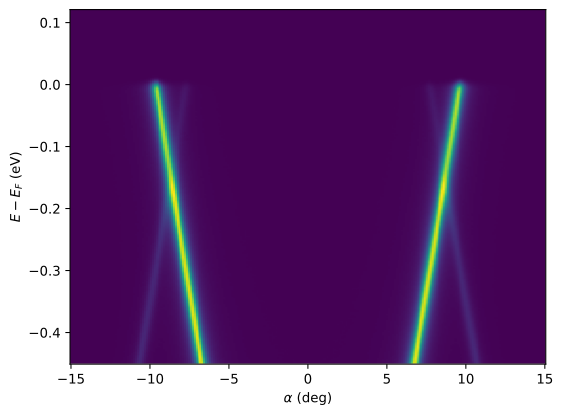
Brilliant! We now have a working loader for our hypothetical setup.
Note
There are more class attributes and methods that can be inherited or overridden to customize the loader’s behavior.
For single-file loaders which save data in well-known formats such as outputs from Scienta Omicron DA30 analyzers, SES, or NeXus, the implementation can be much more straightforward. See the implementations of existing data loaders for examples.
However, in order to use erlab.io.summarize() with our loader, a few more methods and attributes need to be implemented. These are discussed in the next section.
Summary generation
To enable summary generation, we need to implement two attributes and one method:
formatters: A dictionary that maps attribute or coordinate names in the data to functions that convert the coordinate or attribute value into a human-readable form.summary_attrs: A dictionary that maps summary column names to attribute or coordinate names in the data. A callable can also be used to generate entries for attributes that are not directly present in the data.files_for_summary: A method that takes a path to a directory and returns a list of file paths in the directory that are associated with the loader.
You can also choose to implement the following attribute to further customize the summary:
summary_sort: A string that determines the column name to sort the summary table with.If not provided, the table will respect the order of the files returned by
files_for_summary.
To improve the performance of summary generation, you can optionally implement load_single to utilize the without_values argument. If it is True, it means that the values in the returned data of load_single will not be accessed, so you can return the data with its values set to arbitrary numbers. This is useful when only the metadata is needed for the summary. An example of this will be shown below.
def _format_polarization(val) -> str:
    val = round(float(val))
    return {0: "LH", 2: "LV", -1: "RC", 1: "LC"}.get(val, str(val))


def _parse_time(darr: xr.DataArray) -> datetime.datetime:
    return datetime.datetime.strptime(
        f"{darr.attrs['Date']} {darr.attrs['Time']}", "%d/%m/%Y %I:%M:%S %p"
    )


def _determine_kind(darr: xr.DataArray) -> str:
    data_type = "xps"
    if "alpha" in darr.dims:
        data_type = "cut"
    if "beta" in darr.dims:
        data_type = "map"
    if "hv" in darr.dims:
        data_type = "hvdep"
    return data_type


class ExampleLoaderComplete(ExampleLoader):
    name = "example_complete"
    description = "Example loader that supports summary generation"

    formatters = {
        "polarization": _format_polarization,
        "LensMode": lambda x: x.replace("Angular", "A"),
    }

    summary_attrs = {
        "Time": _parse_time,
        "Type": _determine_kind,
        "Lens Mode": "LensMode",
        "Scan Type": "SpectrumType",
        "T(K)": "sample_temp",
        "Pass E": "PassEnergy",
        "Polarization": "polarization",
        "hv": "hv",
        "x": "X",
        "y": "Y",
        "z": "Z",
        "polar": "beta",
        "tilt": "xi",
        "azi": "delta",
    }

    summary_sort = "Time"

    def load_single(self, file_path, without_values=False):
        darr = xr.open_dataarray(file_path, engine="h5netcdf")

        if without_values:
            # Prevent loading values into memory
            return xr.DataArray(
                np.zeros(darr.shape, darr.dtype),
                coords=darr.coords,
                dims=darr.dims,
                attrs=darr.attrs,
                name=darr.name,
            )

        return darr

    def files_for_summary(self, data_dir):
        return erlab.io.utils.get_files(data_dir, extensions=[".h5"])


erlab.io.loaders
| Name | Description | Loader class |
|---|---|---|
| da30 | Scienta Omicron DA30 with SES | erlab.io.plugins.da30.DA30Loader |
| erpes | KAIST home lab setup | erlab.io.plugins.erpes.ERPESLoader |
| esm | NSLS-II Beamline ID21 ESM | erlab.io.plugins.esm.ESMLoader |
| example | Example loader for multiple files | __main__.ExampleLoader |
| example_complete | Example loader that supports summary generation | __main__.ExampleLoaderComplete |
| hers | ALS Beamline 10.0.1 HERS | erlab.io.plugins.hers.HERSLoader |
| i05 | Diamond Beamline I05 | erlab.io.plugins.i05.I05Loader |
| kriss | KRISS ARPES-MBE | erlab.io.plugins.kriss.KRISSLoader |
| lorea | ALBA Beamline 20 LOREA | erlab.io.plugins.lorea.LOREALoader |
| maestro | ALS Beamline 7.0.2.1 MAESTRO | erlab.io.plugins.maestro.MAESTROMicroLoader |
| mbs | MB Scientific .txt and .krx files | erlab.io.plugins.mbs.MBSLoader |
| merlin | ALS Beamline 4.0.3 MERLIN | erlab.io.plugins.merlin.MERLINLoader |
| my_loader | Barebones loader for CSV files | __main__.MyLoader |
| pal4a1 | PAL Beamline 4A1 | erlab.io.plugins.pal4a1.PAL4A1Loader |
| snu1 | System 1 at Seoul National University | erlab.io.plugins.snu1.System1Loader |
| ssrl52 | SSRL Beamline 5-2 | erlab.io.plugins.ssrl52.SSRL52Loader |
| Current loader | example |
|---|---|
| Current data directory | /tmp/tmpn67qr8ub |
Let’s see how the resulting summary looks like.
Note
If ipywidgets is not installed, only the DataFrame will be displayed.
If you are viewing this documentation online, the summary will not be interactive. Run the code locally to try it out.
erlab.io.set_loader("example_complete")
erlab.io.summarize()
Loading: 0%| | 0/10 [00:00<?, ?it/s]
Loading: 40%|████ | 4/10 [00:00<00:00, 35.81it/s]
Loading: 80%|████████ | 8/10 [00:00<00:00, 36.17it/s]
Loading: 100%|██████████| 10/10 [00:00<00:00, 35.97it/s]
| Time | Type | Lens Mode | Scan Type | T(K) | Pass E | Polarization | hv | x | y | z | polar | tilt | azi | |
|---|---|---|---|---|---|---|---|---|---|---|---|---|---|---|
| File Name | ||||||||||||||
| data_001_S001 | 2026-07-12 13:22:57 | map | A30 | Fixed | 20 | 10 | LH | 50 | 0 | 0 | 0 | 2→7 (0.5556, 10) | 0 | 0 |
| data_002 | 2026-07-12 13:22:58 | cut | A30 | Fixed | 20 | 10 | LH | 50 | 0 | 0 | 0 | 5 | 0 | 0 |
| data_003 | 2026-07-12 13:22:58 | cut | A30 | Fixed | 20 | 10 | LH | 50 | 0 | 0 | 0 | 5 | 0 | 0 |
| data_004 | 2026-07-12 13:22:58 | cut | A30 | Fixed | 20 | 10 | LH | 50 | 0 | 0 | 0 | 5 | 0 | 0 |
| data_005 | 2026-07-12 13:22:58 | cut | A30 | Fixed | 20 | 10 | LH | 50 | 0 | 0 | 0 | 5 | 0 | 0 |
Each cell in the summary table is formatted with formatter after applying the formatters.
Tips
The data loading framework is designed to be simple and flexible, but it may not cover all possible setups. If you encounter a setup that cannot be loaded with the existing API, please let us know by opening an issue!
Before implementing a loader, see
erlab.io.dataloaderfor descriptions about each attribute, and the values and types of the expected outputs. The implementation of existing loaders in theerlab.io.pluginsmodule is a good starting point; see the source code on github.If you wish to add general post-processing steps such as fixing the sign of the binding energy coordinates, you can reimplement
post_processwhich by default handles coordinate and attribute renaming.For complex data structures, constructing a full path from just the sequence number and the data directory can be difficult. In this case,
identifycan be implemented to take additional keyword arguments. All additional keyword arguments passed toloadare passed toidentify.For instance, consider data with different prefixes like
A_001.h5,A_002.h5,B_001.h5, etc. stored in the same directory. In this case, we can’t uniquely infer the file path from the sequence number alone. In this case,identifycan be implemented to take an additionalprefixargument to eliminate the ambiguity, after whichA_001.h5can be loaded witherlab.io.load(1, prefix="A").If there are multiple file scans in this setup like
A_001_S001.h5,A_001_S002.h5, etc., we would want to pass theprefixparameter toloadfrom an identifier given as a file name. This is where the second return value ofinfer_indexcomes in handy, where you can return a dictionary which is passed toload.For an example of this, see the implementation of
erlab.io.plugins.erpes.ERPESLoader.If you have implemented a new loader or have improved an existing one, consider contributing it to the ERLabPy project by opening a pull request. We are always looking for new loaders to support more experimental setups! See more about contributing here.
Don’t forget to cleanup the temporary directory!
tmp_dir.cleanup()