Curve fitting
Curve fitting in ERLabPy largely relies on lmfit, a flexible curve fitting library for Python, and xarray-lmfit, a compatibility layer between xarray objects and lmfit models.
ERLabPy also provides optional integration of lmfit models with iminuit , which is a Python interface to the Minuit C++ library developed at CERN.
Note
If you are new to lmfit or xarray-lmfit, visit the lmfit documentation and the xarray-lmfit user guide first!
In this tutorial, we begin with some convenient functions that ERLabPy provides for common tasks such as Fermi edge fitting. Next, we will introduce some models that are available in ERLabPy. Finally, we will show how to use iminuit with lmfit models.
import lmfit
import matplotlib.pyplot as plt
import numpy as np
import xarray as xr

import erlab.analysis as era
import erlab.plotting as eplt
from erlab.io.exampledata import generate_gold_edge
Fermi edge fitting
Functions related to the Fermi edge are available in erlab.analysis.gold. To fit a polynomial to a Fermi edge, you can use erlab.analysis.gold.poly().
Hint
The interactive Fermi edge fitting tool erlab.interactive.goldtool() can be used to generate the code below interactively.
gold = generate_gold_edge(temp=100, seed=1)

result = era.gold.poly(
    gold,
    angle_range=(-15, 15),
    eV_range=(-0.2, 0.2),
    temp=100.0,
    vary_temp=False,
    bkg_slope=False,
    degree=2,
    plot=True,
)
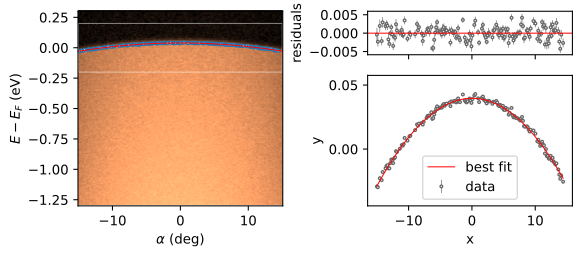
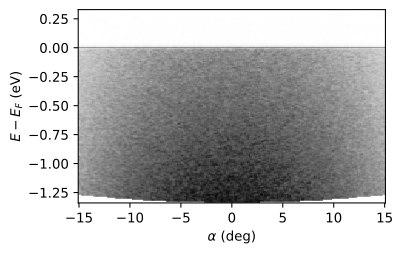
The resulting polynomial can be used to correct the Fermi edge with erlab.analysis.gold.correct_with_edge():
corrected = era.gold.correct_with_edge(gold, result)

corrected.qplot(cmap="Greys")  # Plot the corrected data
eplt.fermiline()  # Annotate the Fermi level
<matplotlib.lines.Line2D at 0x7099e2ef0110>
Pre-defined models
Creating composite models with different prefixes every time can be cumbersome, so ERLabPy provides some pre-defined models in erlab.analysis.fit.models.
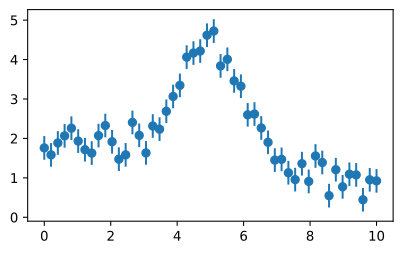
Before fitting, let us generate a Gaussian peak on a linear background:
# Generate toy data
x = np.linspace(0, 10, 50)
y = -0.1 * x + 2 + 3 * np.exp(-((x - 5) ** 2) / (2 * 1**2))

# Add some noise with fixed seed for reproducibility
rng = np.random.default_rng(5)
yerr = np.full_like(x, 0.3)
y = rng.normal(y, yerr)

# Plot the data
plt.errorbar(x, y, yerr, fmt="o")
<ErrorbarContainer object of 3 artists>
Fitting multiple peaks
One example is MultiPeakModel, which works like a composite model of multiple Gaussian or Lorentzian peaks.
By supplying keyword arguments, you can specify the number of peaks, their shapes, whether to multiply with a Fermi-Dirac distribution, the shape of the background, and whether to convolve the result with experimental resolution.
For a detailed explanation of all the arguments, see its documentation.
The model can be constructed as follows:
model = era.fit.models.MultiPeakModel(
    npeaks=1, peak_shapes=["gaussian"], fd=False, background="linear", convolve=False
)
params = model.make_params(p0_center=5.0, p0_width=0.2, p0_height=3.0)
params
| name | value | initial value | min | max | vary | expression |
|---|---|---|---|---|---|---|
| p0_center | 5.00000000 | 5.0 | -inf | inf | True | |
| p0_width | 0.20000000 | 0.2 | 0.00000000 | inf | True | |
| p0_height | 3.00000000 | 3.0 | 0.00000000 | inf | True | |
| const_bkg | 0.00000000 | None | -inf | inf | True | |
| lin_bkg | 0.00000000 | None | -inf | inf | True | |
| p0_sigma | 0.08493218 | None | -inf | inf | False | p0_width / (2 * sqrt(2 * log(2))) |
| p0_amplitude | 0.10164911 | None | -inf | inf | False | p0_height * p0_sigma / sqrt(2 * pi) |
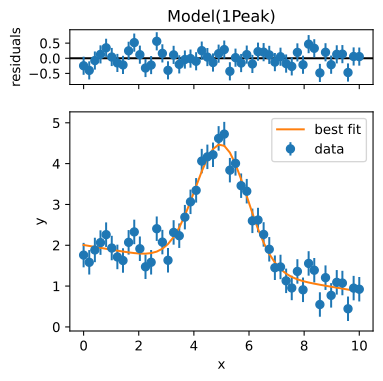
We can now fit the model to the toy data:
result = model.fit(y, x=x, params=params, weights=1 / yerr)
_ = result.plot()
/home/docs/checkouts/readthedocs.org/user_builds/erlabpy/envs/v3.14.0/lib/python3.12/site-packages/IPython/core/events.py:82: UserWarning: There are no gridspecs with layoutgrids. Possibly did not call parent GridSpec with the "figure" keyword
  func(*args, **kwargs)
/home/docs/checkouts/readthedocs.org/user_builds/erlabpy/envs/v3.14.0/lib/python3.12/site-packages/IPython/core/pylabtools.py:170: UserWarning: There are no gridspecs with layoutgrids. Possibly did not call parent GridSpec with the "figure" keyword
  fig.canvas.print_figure(bytes_io, **kw)
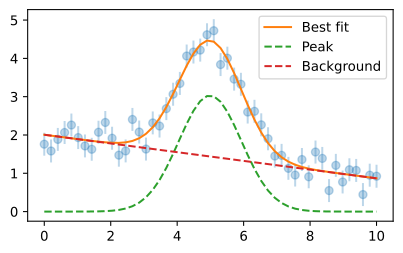
We can also plot components.
comps = result.eval_components()
plt.errorbar(x, y, yerr, fmt="o", zorder=-1, alpha=0.3)
plt.plot(x, result.eval(), label="Best fit")
plt.plot(x, comps["1Peak_p0"], "--", label="Peak")
plt.plot(x, comps["1Peak_bkg"], "--", label="Background")
plt.legend()
<matplotlib.legend.Legend at 0x7099e44d63f0>
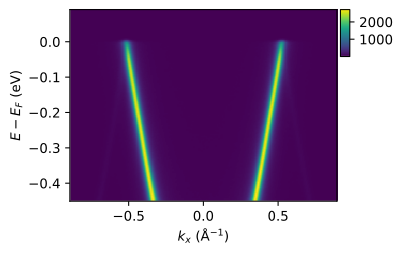
Now, let us try fitting MDCs cut from simulated data with multiple Lorentzian peaks, convolved with a common instrumental resolution.
from erlab.io.exampledata import generate_data

data = generate_data(seed=1).T
cut = data.qsel(ky=0.3)
cut.qplot(colorbar=True)
<matplotlib.image.AxesImage at 0x7099e01a33e0>
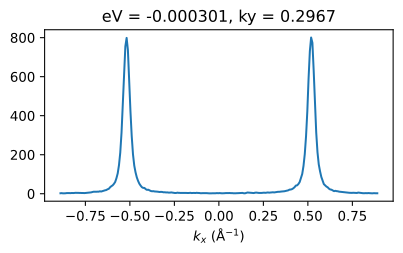
mdc = cut.qsel(eV=0.0)
mdc.qplot()
[<matplotlib.lines.Line2D at 0x7099e01a1100>]
First, we define the model and set the initial parameters.
model = era.fit.models.MultiPeakModel(
    npeaks=2, peak_shapes=["lorentzian"], fd=False, background="linear", convolve=True
)

params = model.make_params(
    p0_center=-0.5,
    p1_center=0.5,
    p0_width=0.03,
    p1_width=0.03,
    lin_bkg={"value": 0.0, "vary": False},
    const_bkg=0.0,
    resolution=0.03,
)
params
| name | value | initial value | min | max | vary | expression |
|---|---|---|---|---|---|---|
| p0_center | -0.50000000 | -0.5 | -inf | inf | True | |
| p0_width | 0.03000000 | 0.03 | 0.00000000 | inf | True | |
| p0_height | -inf | None | 0.00000000 | inf | True | |
| p1_center | 0.50000000 | 0.5 | -inf | inf | True | |
| p1_width | 0.03000000 | 0.03 | 0.00000000 | inf | True | |
| p1_height | -inf | None | 0.00000000 | inf | True | |
| const_bkg | 0.00000000 | 0.0 | -inf | inf | True | |
| lin_bkg | 0.00000000 | 0.0 | -inf | inf | False | |
| resolution | 0.03000000 | 0.03 | 0.00000000 | inf | True | |
| p0_sigma | 0.01500000 | None | -inf | inf | False | p0_width / 2 |
| p0_amplitude | -inf | None | -inf | inf | False | p0_height * p0_sigma * pi |
| p1_sigma | 0.01500000 | None | -inf | inf | False | p1_width / 2 |
| p1_amplitude | -inf | None | -inf | inf | False | p1_height * p1_sigma * pi |
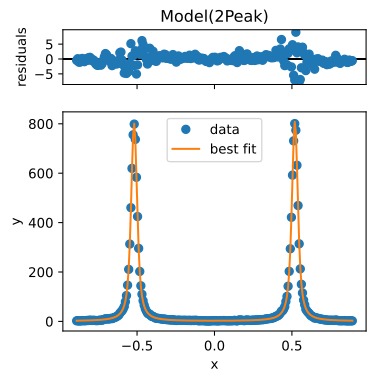
Then, we can fit the model to the data using xarray.DataArray.xlm.modelfit() from xarray-lmfit:
result = mdc.xlm.modelfit("kx", model=model, params=params)
_ = result.modelfit_results.item().plot()
/home/docs/checkouts/readthedocs.org/user_builds/erlabpy/envs/v3.14.0/lib/python3.12/site-packages/IPython/core/events.py:82: UserWarning: There are no gridspecs with layoutgrids. Possibly did not call parent GridSpec with the "figure" keyword
  func(*args, **kwargs)
/home/docs/checkouts/readthedocs.org/user_builds/erlabpy/envs/v3.14.0/lib/python3.12/site-packages/IPython/core/pylabtools.py:170: UserWarning: There are no gridspecs with layoutgrids. Possibly did not call parent GridSpec with the "figure" keyword
  fig.canvas.print_figure(bytes_io, **kw)
Fitting across multiple dimensions
Note
There is a dedicated module for Fermi edge fitting and correction, described [here](fermi edge fitting). The following example is for illustrative purposes.
Suppose you have to fit a single model to multiple data points across some dimension, or even multiple dimensions. xarray-lmfit can handle this with ease.
Let’s demonstrate this with a simulated cut that represents a curved Fermi edge at 100 K, with an energy broadening of 20 meV.
from erlab.io.exampledata import generate_gold_edge

gold = generate_gold_edge(temp=100, Eres=0.02, seed=1)
gold.qplot(cmap="Greys")
<matplotlib.image.AxesImage at 0x7099e019be60>
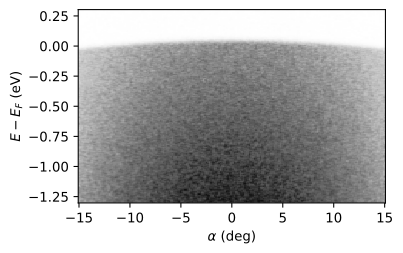
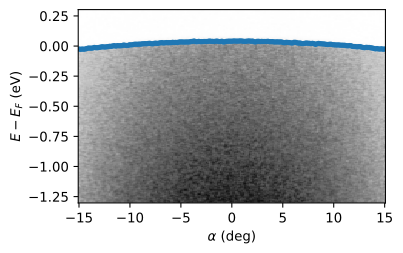
We first select ± 0.2 eV around the Fermi level and fit the model across the energy axis for every EDC.
gold_selected = gold.sel(eV=slice(-0.2, 0.2))
result_ds = gold_selected.xlm.modelfit(
    "eV",
    era.fit.models.FermiEdgeModel(),
    params={
        "temp": {"value": 100.0, "vary": False},
        "back1": {"value": 0.0, "vary": False},
    },
    guess=True,
)
result_ds
<xarray.Dataset> Size: 358kB
Dimensions:                (alpha: 200, param: 7, cov_i: 7, cov_j: 7,
                            fit_stat: 8, eV: 75)
Coordinates:
  * alpha                  (alpha) float64 2kB -15.0 -14.85 -14.7 ... 14.85 15.0
  * eV                     (eV) float64 600B -0.1977 -0.1923 ... 0.193 0.1983
  * param                  (param) <U10 280B 'center' 'temp' ... 'dos0' 'dos1'
  * fit_stat               (fit_stat) <U6 192B 'nfev' 'nvarys' ... 'aic' 'bic'
  * cov_i                  (cov_i) <U10 280B 'center' 'temp' ... 'dos0' 'dos1'
  * cov_j                  (cov_j) <U10 280B 'center' 'temp' ... 'dos0' 'dos1'
Data variables:
    modelfit_results       (alpha) object 2kB <lmfit.model.ModelResult object...
    modelfit_coefficients  (alpha, param) float64 11kB -0.02484 100.0 ... -77.56
    modelfit_stderr        (alpha, param) float64 11kB nan nan ... 2.057 15.11
    modelfit_covariance    (alpha, cov_i, cov_j) float64 78kB nan nan ... 228.4
    modelfit_stats         (alpha, fit_stat) float64 13kB 45.0 5.0 ... 188.8
    modelfit_data          (alpha, eV) float64 120kB 65.86 55.5 ... 1.385 0.3062
modelfit_best_fit (alpha, eV) float64 120kB 62.03 61.72 ... 0.6527Notice how the data variables in the resulting Dataset now depend on the coordinate
alpha. Let’s plot the center of the edge as a function of angle!
gold.qplot(cmap="Greys")
plt.errorbar(
    gold_selected.alpha,
    result_ds.modelfit_coefficients.sel(param="center"),
    result_ds.modelfit_stderr.sel(param="center"),
    fmt=".",
)
<ErrorbarContainer object of 3 artists>
Fitting multidimensional models
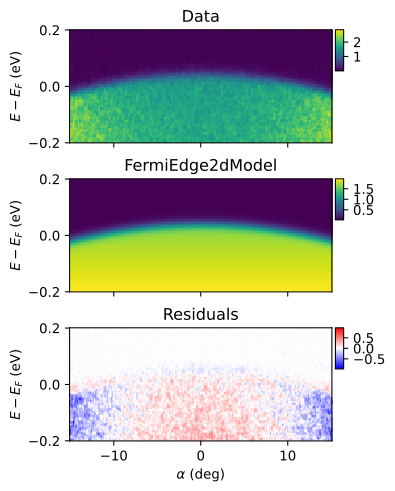
Fitting is not limited to 1D models. The following example demonstrates a global fit to the cut with a multidimensional model. First, we normalize the data with the averaged intensity of each EDC and then fit the data to FermiEdge2dModel.
gold_norm = gold_selected / gold_selected.mean("eV")
result_2d = gold_norm.T.xlm.modelfit(
    coords=["eV", "alpha"],
    model=era.fit.models.FermiEdge2dModel(),
    params={"temp": {"value": 100.0, "vary": False}},
    guess=True,
)
result_2d
<xarray.Dataset> Size: 244kB
Dimensions:                (param: 8, cov_i: 8, cov_j: 8, fit_stat: 8, eV: 75,
                            alpha: 200)
Coordinates:
  * eV                     (eV) float64 600B -0.1977 -0.1923 ... 0.193 0.1983
  * alpha                  (alpha) float64 2kB -15.0 -14.85 -14.7 ... 14.85 15.0
  * param                  (param) <U10 320B 'c0' 'c1' ... 'offset' 'resolution'
  * fit_stat               (fit_stat) <U6 192B 'nfev' 'nvarys' ... 'aic' 'bic'
  * cov_i                  (cov_i) <U10 320B 'c0' 'c1' ... 'offset' 'resolution'
  * cov_j                  (cov_j) <U10 320B 'c0' 'c1' ... 'offset' 'resolution'
Data variables:
    modelfit_results       object 8B <lmfit.model.ModelResult object at 0x709...
    modelfit_coefficients  (param) float64 64B 0.03855 1.225e-05 ... 0.01538
    modelfit_stderr        (param) float64 64B 0.0001811 1.198e-05 ... 0.0009251
    modelfit_covariance    (cov_i, cov_j) float64 512B 3.279e-08 ... 8.558e-07
    modelfit_stats         (fit_stat) float64 64B 82.0 7.0 ... -5.884e+04
    modelfit_data          (eV, alpha) float64 120kB 2.598 2.471 ... 0.01212
modelfit_best_fit (eV, alpha) float64 120kB 1.972 1.972 ... 0.02022Let’s plot the fit results and the residuals.
best_fit = result_2d.modelfit_best_fit.transpose(*gold_norm.dims)

fig, axs = eplt.plot_slices(
    [gold_norm, best_fit, best_fit - gold_norm],
    figsize=(4, 5),
    cmap=["viridis", "viridis", "bwr"],
    norm=[plt.Normalize(), plt.Normalize(), eplt.CenteredPowerNorm(1.0, vcenter=0)],
    colorbar="all",
    hide_colorbar_ticks=False,
    colorbar_kw={"width": 7},
)
eplt.set_titles(axs, ["Data", "FermiEdge2dModel", "Residuals"])
Fitting background models
xarray.Dataset.xlm.modelfit() and xarray.DataArray.xlm.modelfit() works with any lmfit model, including background models from lmfitxps. If you have lmfitxps installed, you can use the ShirleyBG model to iteratively fit a Shirley background to the data:
from lmfitxps.models import ShirleyBG
from lmfit.models import GaussianModel

darr.xlm.modelfit("alpha", GaussianModel() + ShirleyBG())
Visualizing fits
Note
If you are viewing this documentation online, the plots will not be interactive. Run the code locally to try it out.
If hvplot is installed, we can visualize the fit results interactively with the xarray.Dataset.qshow() accessor.
To plot the data with the fit and fit components:
result_ds.qshow(plot_components=True)
To plot each parameter as a function of the coordinate:
result_ds.qshow.params()
Parallelization
For non-dask objects, you can achieve joblib-based parallelization:
For non-dask Datasets, basic parallelization across multiple data variables can be achieved with the
parallelargument toxarray.Dataset.xlm.modelfit().For parallelizing fits on a single DataArray along a dimension with many points, the
xarray.DataArray.parallel_fit()accessor can be used. This method is similar toxarray.DataArray.xlm.modelfit(), but requires the name of the dimension to parallelize over instead of the coordinates to fit along. For example, to parallelize the fit in the previous example, you can use the following code:gold_selected.parallel_fit( dim="alpha", model=FermiEdgeModel(), params={"temp": {"value": 100.0, "vary": False}}, guess=True, )
Note
Note that the initial run will take a long time due to the overhead of creating parallel workers. Subsequent calls will run faster, since joblib’s default backend will try to reuse the workers.
The accessor has some intrinsic overhead due to post-processing. If you need the best performance, handle the parallelization yourself with joblib and
lmfit.Model.fit.
Saving and loading fits
See the xarray-lmfit documentation for details on saving and loading fit results.
Using iminuit
Note
This part requires the optional iminuit dependency.
iminuit is a powerful Python interface to the Minuit C++ library developed at CERN. To learn more, see the iminuit documentation.
ERLabPy provides a thin wrapper around iminuit.Minuit that allows you to use lmfit models with iminuit. The example below conducts the same fit as the previous one, but using iminuit.
model = era.fit.models.MultiPeakModel(
    npeaks=2, peak_shapes=["lorentzian"], fd=False, convolve=True
)

m = era.fit.minuit.Minuit.from_lmfit(
    model,
    mdc,
    mdc.kx,
    p0_center=-0.5,
    p1_center=0.5,
    p0_width=0.03,
    p1_width=0.03,
    p0_height=1000,
    p1_height=1000,
    lin_bkg={"value": 0.0, "vary": False},
    const_bkg=0.0,
    resolution=0.03,
)

m.migrad()
m.minos()
m.hesse()
| Migrad | |
|---|---|
| FCN = 938.4 (χ²/ndof = 3.9) | Nfcn = 1333 |
| EDM = 0.000132 (Goal: 0.0002) | time = 0.2 sec |
| Valid Minimum | Below EDM threshold (goal x 10) |
| No parameters at limit | Below call limit |
| Hesse ok | Covariance accurate |
| Name | Value | Hesse Error | Minos Error- | Minos Error+ | Limit- | Limit+ | Fixed | |
|---|---|---|---|---|---|---|---|---|
| 0 | p0_center | -518.935e-3 | 0.017e-3 | -0.017e-3 | 0.017e-3 | |||
| 1 | p0_width | 30.38e-3 | 0.11e-3 | -0.11e-3 | 0.11e-3 | 0 | ||
| 2 | p0_height | 1.0804e3 | 0.0031e3 | -0.0031e3 | 0.0031e3 | 0 | ||
| 3 | p1_center | 519.207e-3 | 0.017e-3 | -0.017e-3 | 0.017e-3 | |||
| 4 | p1_width | 30.32e-3 | 0.11e-3 | -0.11e-3 | 0.11e-3 | 0 | ||
| 5 | p1_height | 1.0912e3 | 0.0031e3 | -0.0031e3 | 0.0031e3 | 0 | ||
| 6 | const_bkg | 0.87 | 0.08 | -0.08 | 0.08 | |||
| 7 | lin_bkg | 0.0 | 0.1 | yes | ||||
| 8 | resolution | 26.89e-3 | 0.12e-3 | -0.12e-3 | 0.12e-3 | 0 |
| p0_center | p0_width | p0_height | p1_center | p1_width | p1_height | const_bkg | resolution | |||||||||
|---|---|---|---|---|---|---|---|---|---|---|---|---|---|---|---|---|
| Error | -0.017e-3 | 0.017e-3 | -0.11e-3 | 0.11e-3 | -3.1 | 3.1 | -0.017e-3 | 0.017e-3 | -0.11e-3 | 0.11e-3 | -3.1 | 3.1 | -0.08 | 0.08 | -0.12e-3 | 0.12e-3 |
| Valid | True | True | True | True | True | True | True | True | True | True | True | True | True | True | True | True |
| At Limit | False | False | False | False | False | False | False | False | False | False | False | False | False | False | False | False |
| Max FCN | False | False | False | False | False | False | False | False | False | False | False | False | False | False | False | False |
| New Min | False | False | False | False | False | False | False | False | False | False | False | False | False | False | False | False |
| p0_center | p0_width | p0_height | p1_center | p1_width | p1_height | const_bkg | lin_bkg | resolution | |
|---|---|---|---|---|---|---|---|---|---|
| p0_center | 2.97e-10 | 0 | 53.08e-9 | -0 | -0.01e-9 (-0.004) | 235.92e-9 (0.004) | -0.66e-9 | 0 | 0.01e-9 (0.005) |
| p0_width | 0 | 1.27e-08 | -339.751e-6 (-0.974) | 0.02e-9 (0.012) | 0.010e-6 (0.792) | -283.577e-6 (-0.803) | -4.642e-6 (-0.505) | 0 | -0.012e-6 (-0.878) |
| p0_height | 53.08e-9 | -339.751e-6 (-0.974) | 9.57 | -649.92e-9 (-0.012) | -280.127e-6 (-0.804) | 8 (0.822) | 0.112 (0.443) | 0 | 327.678e-6 (0.904) |
| p1_center | -0 | 0.02e-9 (0.012) | -649.92e-9 (-0.012) | 2.92e-10 | 0.02e-9 (0.008) | -493.21e-9 (-0.009) | -4.85e-9 (-0.003) | 0 | -0.03e-9 (-0.014) |
| p1_width | -0.01e-9 (-0.004) | 0.010e-6 (0.792) | -280.127e-6 (-0.804) | 0.02e-9 (0.008) | 1.27e-08 | -344.032e-6 (-0.975) | -4.639e-6 (-0.504) | 0 | -0.012e-6 (-0.881) |
| p1_height | 235.92e-9 (0.004) | -283.577e-6 (-0.803) | 8 (0.822) | -493.21e-9 (-0.009) | -344.032e-6 (-0.975) | 9.81 | 0.113 (0.443) | 0 | 332.495e-6 (0.906) |
| const_bkg | -0.66e-9 | -4.642e-6 (-0.505) | 0.112 (0.443) | -4.85e-9 (-0.003) | -4.639e-6 (-0.504) | 0.113 (0.443) | 0.00666 | 0.000 | 4.120e-6 (0.431) |
| lin_bkg | 0 | 0 | 0 | 0 | 0 | 0 | 0.000 | 0 | 0 |
| resolution | 0.01e-9 (0.005) | -0.012e-6 (-0.878) | 327.678e-6 (0.904) | -0.03e-9 (-0.014) | -0.012e-6 (-0.881) | 332.495e-6 (0.906) | 4.120e-6 (0.431) | 0 | 1.37e-08 |
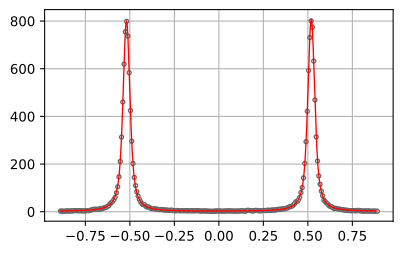
You can also use the interactive fitting interface provided by iminuit.
Note
Requires ipywidgets to be installed.
If you are viewing this documentation online, changing the sliders won’t change the plot. run the code locally to try it out.
m.interactive()